Your workspace, in your pocket.
Book a desk from the floor plan, grab a meeting room and manage every reservation from your phone. Available free on iOS and Android, with Smart Bookings and Favourites built in.




- iOS + Android native apps for iPhone and Android phones
- £0 included with your Clearooms subscription
- Desks + Rooms book both from a single app
- 4 colours read desk status at a glance
Everything you do in the web portal, now on the go.
Manage your workspace from anywhere. The Clearooms app brings desk booking, meeting rooms, Smart Bookings and your profile to your phone, so you are ready wherever the day takes you.
-
📍
Floor plan desk booking
Tap a desk on the interactive office floor plan to book in seconds. Colour-coded status shows what's free at a glance — green available, red unavailable, blue booked by you, orange partially booked.
-
📋
Meeting room booking
Browse a card-style list of rooms with live availability and expand any room for its resources and services. Use the scroll time bar and date arrows, and add a Google Meet link as you book.
-
📝
My Bookings overview
View everything linked to your account in one place, including past, checked-in and upcoming desk and meeting room reservations.
-
✨
Smart Bookings & Favourites
Access Smart Bookings and Favourites from the app, working just as they do in the web portal, to speed up repeat bookings of the desks, rooms and people you choose most.
-
⚙️
Profile & settings
Manage your default office, language, favourite desks, rooms and colleagues, and custom colour preferences on the go.
-
👥
Book on behalf of others
With the correct permissions, reserve desks or meeting rooms for colleagues and guests — ideal for managers and team coordinators.
From floor plan to booked in a few taps.
Tap a desk, you're booked
Select a desk on the office floor plan to make a booking. The interactive plan makes it easy to find the right spot, and colours are customisable at user level by editing colour preferences in your profile.
- Available
- Unavailable
- Booked by you
- Partially booked
Browse, expand and book
Open the Meeting Rooms tab for a card-style list of every room. A green tick means available, a red cross means busy. Expand a room to see its resources and services, then book.
Tap Book now and complete the same booking form used in the web portal.
Use the scroll time bar to adjust the time range and view availability.
Use the blue date arrows to jump to previous or future days.
Add a Google Meet link as you book. Custom fields are supported, excluding link-type fields.
Let the app find your best seat
The Smart Bookings / Favourites feature works exactly as it does in the web portal. Tap the Smart Booking icon in the bottom-right corner to get matched desks ranked by how well they fit your needs, complete with the equipment each one offers.
Your settings, your bookings, one place
Open My Profile to manage your default office, language, favourite desks, rooms and colleagues, and custom colours. Switch to My Bookings to see everything linked to your account, including past, checked-in and upcoming reservations.
Built for the way you actually work.
A consistent, branded experience from the moment you open the app to the second you check in.
-
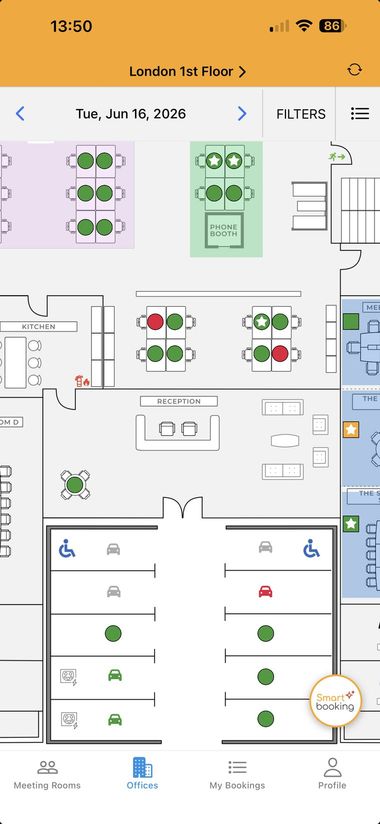
Office view
Colour-coded floor plan for desks, parking and rooms.
-
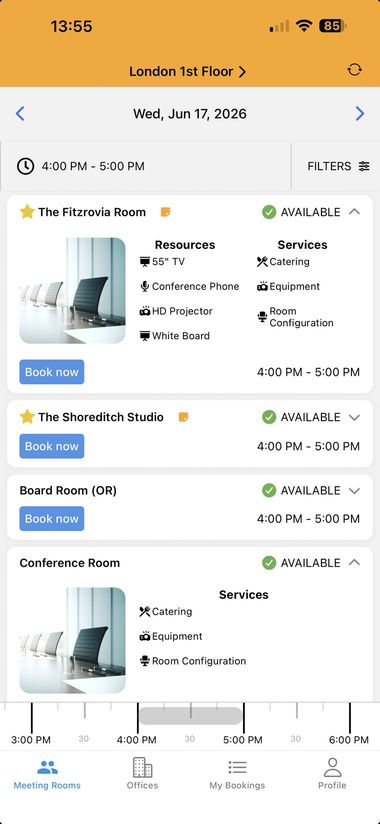
Meeting rooms
Live availability with resources and services per room.
-
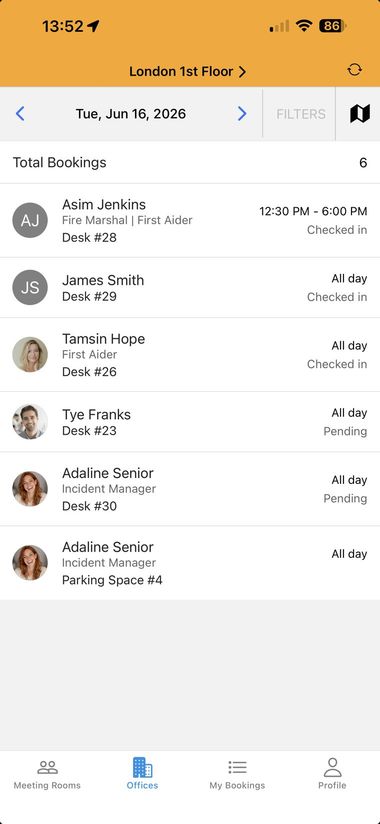
Bookings list
See who's in, roles, desks and check-in status for the day.
-
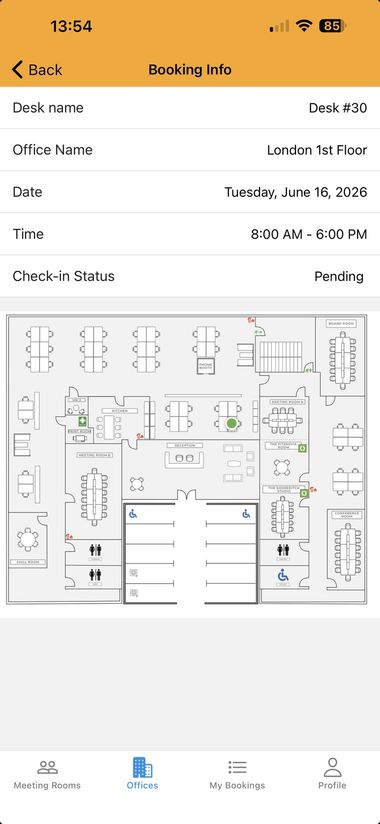
Booking details
Desk, office, date, time and check-in status with a map.
-
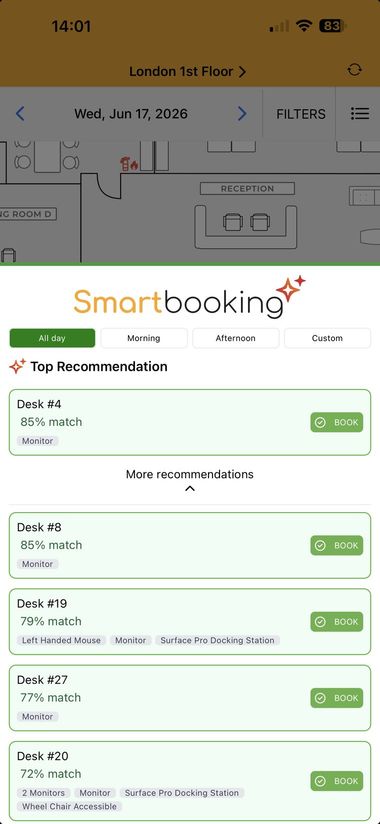
Smart Bookings
Recommended desks ranked by match to your needs.
-
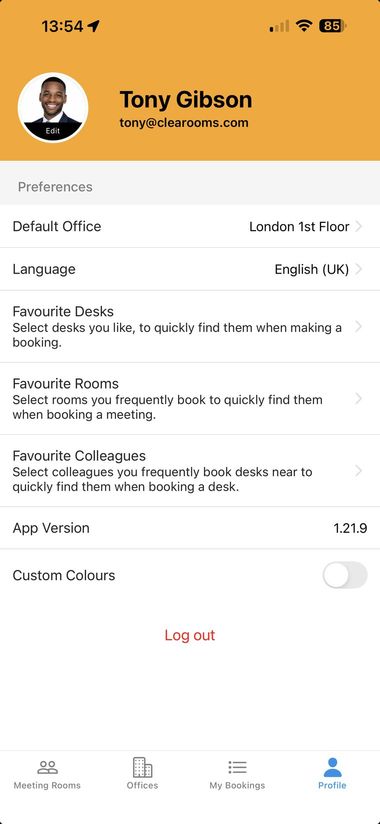
Profile
Default office, language, favourites and custom colours.


Take Clearooms with you
The mobile app is included with your Clearooms subscription. Download it free for iOS or Android and book desks and rooms from anywhere.