Integrations for: Desk Booking, Meeting Rooms and Visitor Management
As an accredited supplier on the UK Government’s Digital Portal, Clearooms has proven its ability to work alongside other services, with scalability, security and ease of use to match. Every integration on this page is included as standard on every Clearooms plan, not gated behind an enterprise tier.


Single Sign-On (SSO) integrations
Clearooms supports single sign-on across all major identity providers. Employees log in with the credentials they already use for your existing workplace platform or their organisation’s identity platform.
-
Microsoft Azure Active Directory (Entra ID)
Log into Clearooms with Microsoft 365 credentials via Azure AD. SCIM provisioning keeps user lifecycle in sync automatically, so IT teams don’t manage two directories by hand.
SSO
-

Google Workspaces
Sign in with Google Workspace credentials. Ideal for teams already running on Google’s productivity suite, with the same lifecycle management via SCIM.
SSO
-
Jumpcloud
Directory-as-a-Service integration for organisations using JumpCloud to manage identity across systems, applications, and networks.
SSO
-
Microsoft AD FS
For organisations still running on-premises Active Directory Federation Services, Clearooms integrates directly with AD FS for authentication.
SSO
-

Okta
Authenticate users through Okta’s identity platform. Widely used in enterprise environments alongside other Okta-managed applications.
SSO
-

OneLogin
SSO via OneLogin for organisations using its identity and access management platform.
SSO
Calendar, workplace and access control integrations
Beyond identity, Clearooms integrates with the workplace tools your teams use every day. Meeting room and desk bookings sync directly with users’ calendars, appear alongside their other meetings, and can trigger downstream actions like unlocking a door on arrival.
-

Zapier integration
Clearooms also connects to 6,000+ apps via Zapier. Booking events can trigger actions in CRMs, HR systems, facilities tools and messaging platforms without custom development.
Workflow automation
-

Google Calendar
Full two-way sync with Google Calendar for organisations running on Google Workspace. Bookings appear in users’ calendars the same way meeting invites do, and changes in either system propagate to the other.
Calendar Integration
-
Microsoft Outlook and Office 365
Two-way calendar sync means desk and meeting room bookings appear alongside your team’s other calendar events. Existing Outlook meeting room resources are picked up automatically and bookable from any of Outlook, the Clearooms mobile app, or the Clearooms web portal.
Calendar Integration
-
Microsoft Teams
Book desks and meeting rooms directly inside the Teams app, without switching between platforms. Booking confirmations and check-in reminders arrive as Teams notifications. IT teams can auto-add Clearooms to all users’ Teams environments through a single Teams policy.
Calendar Integration
-

-
Salto
Salto integrates with Clearooms to automate door access based on active room bookings. Useful for organisations with meeting rooms across multiple floors or restricted zones.
Access Controls
-

Slack
See desk bookings, in-office statuses, expected guests, and check-in reminders directly in Slack. For Slack-first organisations, this replaces the need to open Clearooms as a separate app for most day-to-day actions.
Workspace Management



API
Anything you can do in the Clearooms portal or mobile app can be done via our open API. Sync booking data into your own reporting tools. Trigger workflows in downstream systems when a booking is created or completed. Build custom integrations for the tools we don’t connect to natively.
The API is REST-based, fully documented and available on every plan. For most organisations, the native integrations above cover what’s needed. Where they don’t, the API fills the gap without requiring vendor development on our side.
Contact Us
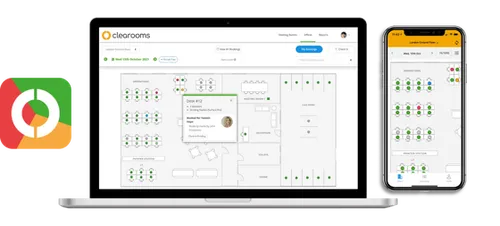
Clearooms, the all-in-one desk and room booking system for hybrid working.


Clearooms integrations FAQs
-
Which calendar integrations does Clearooms support?
Clearooms integrates with Microsoft Outlook, Microsoft Teams, Office 365, and Google Calendar. Bookings sync two-way with users’ existing calendars, so a desk or meeting room reservation shows up alongside their other events, and changes in either system update the other.
-
Does Clearooms integrate with Microsoft Teams?
Yes. Users can book desks and meeting rooms directly inside the Microsoft Teams app, receive booking notifications through Teams, and IT teams can roll out the integration across all users via a Teams policy. Full setup details are covered in our Microsoft Teams integration guide.
-
Is single sign-on included in the Clearooms integration?
Yes. Single sign-on is included on every Clearooms plan, with support for Microsoft Azure AD (Entra ID), Google Workspace, Okta, JumpCloud, Microsoft AD FS, and OneLogin. SCIM user provisioning is also standard, so user lifecycle is managed automatically from your identity provider.
-
Does Clearooms work with door access systems?
Yes. Clearooms integrates with Paxton Access and Salto Systems. When a user with a valid booking arrives, the door is unlocked automatically. This removes the need for separate door codes, reception unlocks, or fobs, and closes the loop between booking a space and physically entering it.
-
Are integrations included on all Clearooms plans, or only enterprise?
Every integration on this page is included on every Clearooms plan. That covers SSO, SCIM, Outlook, Teams, Google Calendar, Slack, Paxton, Salto, and API access. Clearooms is priced per desk and per room rather than per user, with the details on our pricing page.
-
Does Clearooms have an API for custom integrations?
Yes. Anything you can do in the Clearooms portal or mobile app can also be done via the REST API. The API is documented, available on every plan, and used by organisations that need to integrate with tools we don’t connect to natively.